Raspberry Pi also known as only Pi, is a SoC.
A SoC can have all the components a computer or any other electronic device can have, such as Processor, usually an embedded processor, GPU, memory, both permanent and temporary, i-e RAM, ROM, SSD, Flash memory. Additional memory can also be added using SD cards or External Hard disks. I/O units such as USB, HDMI, VGA etc. Networking parts like Ethernet, WLAN adapter. Other components like ADC or DAC, Voltage regulators, timers maybe found on a SoC.
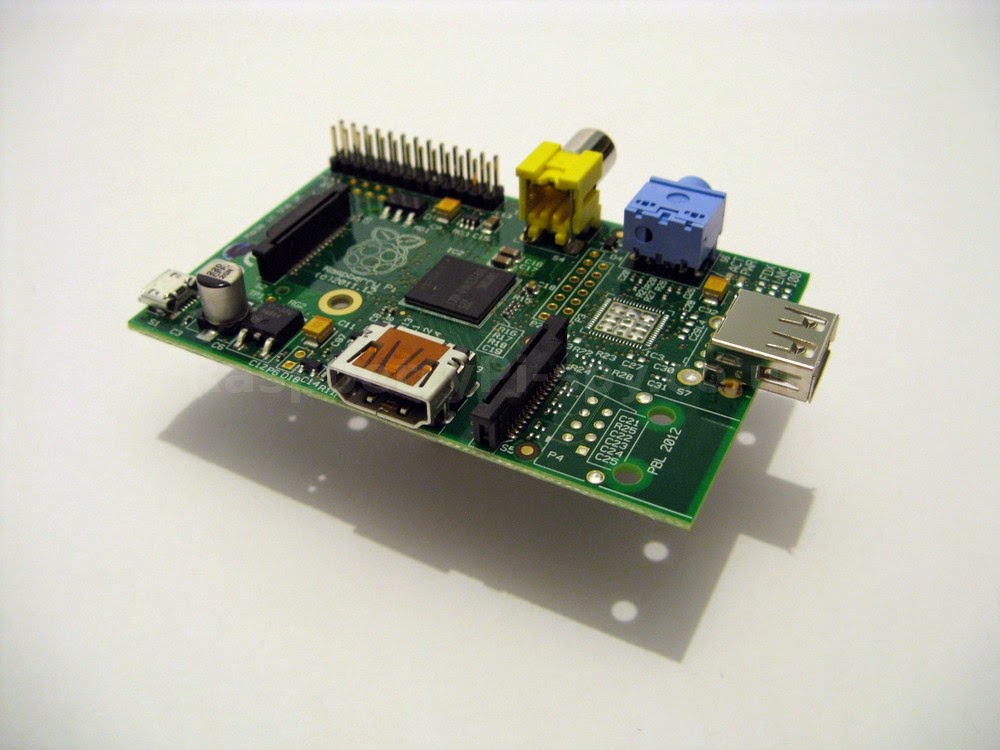
The Raspberry Pi was developed in UK for educational purposes, but now has found many more applications. As described above, it is a SoC, meaning a complete working system with all required components on a single chip.
It is not a processor, it is not just a chip, it is not a micro-controller, it is not an extension or upgrade for a PC. But what it is, that it is minicomputer. That's more like it.
Till now it has two models. Model A and Model B. Model B offers more features than A. The above image is of model A.The below images are of model B, which looks something like this:


So what is a SoC ?
A SoC abbreviation for System on a Chip. It is actually a chip or an integrated circuit which has all of the components of a complete system integrated in it i-e: having attached on it.A SoC can have all the components a computer or any other electronic device can have, such as Processor, usually an embedded processor, GPU, memory, both permanent and temporary, i-e RAM, ROM, SSD, Flash memory. Additional memory can also be added using SD cards or External Hard disks. I/O units such as USB, HDMI, VGA etc. Networking parts like Ethernet, WLAN adapter. Other components like ADC or DAC, Voltage regulators, timers maybe found on a SoC.
Back to Raspberry Pi
It is not a processor, it is not just a chip, it is not a micro-controller, it is not an extension or upgrade for a PC. But what it is, that it is minicomputer. That's more like it.
Till now it has two models. Model A and Model B. Model B offers more features than A. The above image is of model A.The below images are of model B, which looks something like this:
Features
The key features of Raspberry Pi are:- Embedded processor is ARM1176JZFS @ 700 MHz.
- Video core 4 GPU, which is capable of Blue-ray quality playback, using H.264 codecs @ 40MBits/s.
- Open VG libraries.
- Open GL ES 2.0
- 256 MB RAM in Model A. 512 MB RAM in Model B.
- USB support ( Model B ).
- HDMI support.
- Ethernet for Internet connection.
- GPIO ( General Purpose Input/Output ) pins Male connector.
- 3.5 mm audio jack.
Dimensions
The measures of Raspberry Pi are 85.60 mm x 56 mm x 21 mm, or 3.37" x 2.21" x 0.83". It weighs about 45 grams.
What Operating System ( OS ) it has ?
It does not comes with an installed OS, as it does not has any storage device. It boots from a memory/SD card or a hard disk/ solid state, which has to be attached externally. While purchasing one, we can also choose to buy one SD/memory card which comes loaded with an OS, usually Raspbian( Debian Linux redesigned to be compatible with Pi ) or NOOBS setup ( an installer which gives a list of all supported and recommended OSs ). But if you don't want to buy an additional SD card, you can download the same OSs free from their official website, here. After downloading, you can use it with an SD card you already have.Devices able to connect to Raspberry Pi
Nearly everything.- TVs, Monitors ( CRT, LCD, LED )
- Headphones
- All kind of Mobiles including, Android, Windows phones, i Phone/Pads/Pods
- PCs, Mac and all other computers running Linux, Unix etc.
- Head phones, Speakers, Microphones ( through audio jack )
- Cameras, sensors
- Keyboards, Mouse, Touch-pads
- Printers, Plotters
- And many more stuff of the kind
Where to buy ?
You can buy it from the official website. Or from here at element14. Or from here.

Many ways to use it
It can be used in many many ways. Some of the uses are listed below:- As a media center for watching movies, playing songs, just connect it to your TV and use RaspBMC, an alternate OS similar to XBMC.
- As a NAS ( Network Attached Storage ), or in other words, your own Cloud server.
- Build Arcade machines.
- It can be used to build Robots.
- It can be used to build security systems.
- A Tablet computer, by running Android on it.
- To build a UAV
- Make a land-line phone.
- Make a Supercomputer.
That would be all. Hope you like it !

